AI STUDIO · Camera angle
AI camera angle control:
the same shot, another side.
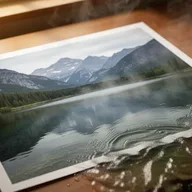
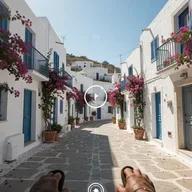
Move the camera after the picture was taken. Turn around the subject, look from above, or step back for a wide shot, and get the same scene from the new position.
Start creatingOpens Camera angle in Postally. Generation uses credits, shown before you run.
KEY FEATURES
A second camera you did not bring.
Get the angle you missed without setting the shot up again.
Turn around it.
From 0 to 345 degrees in steps of 15: front, right, back, left and everything between.
Look from above.
Raise the camera up to 60 degrees.
Wide or close-up.
Keep the framing, step back, or move in.
Four at a time.
Run up to four and compare.
Price before you run.
The credits are on the button before you start, so nothing is spent by surprise.
Lands in your library.
Every result saves to the brand’s Media library, ready to attach to a post, send for approval and schedule.
HOW IT WORKS
Change the angle in three steps.
- Step 1
Add the picture
One image.
- Step 2
Set the camera
How far to turn, how high to look from, and the shot size.
- Step 3
Generate
The new angle saves to your library as a PNG.
WHAT YOU CAN MAKE
Angles worth having.
Camera angle starts from your picture and three settings, so there is no prompt to write.
Product from every side
Front, three-quarter, side and back from one photo.
A top-down version
Look from above for a flat-lay style shot.
Storyboard coverage
A wide and a close-up of the same scene for a sequence.
Start frames for video
Make the angle you want, then animate it in Frame to video.
MODELS
The angle model.
Camera angle runs on one model.
- Black Forest Labs
FLUX.2 Multiple Angles
Re-renders the picture from the camera position you set, keeping its shape.
QUESTIONS
Before you start.
From 0 to 345 degrees around the subject in steps of 15, and up to 60 degrees from above.
The tool re-renders the same scene from the new position. Sides the original never showed are filled in by the model, so check them.
Run up to four here. Multi-view makes nine angles of one subject in one go.
Runs use AI credits. The tool shows the credits on its button before you run, so you see the price first. See the pricing page for the current plans.
Into your brand's Media library, like everything made in AI Studio. From there you can attach it to a post, send it for approval and schedule it.
Yes. The link opens the tool inside Postally, so you sign in first. Postally is in early access through the waitlist.

Camera angle
Walk around your own picture.
Open Camera angle, add the picture and set the camera. The price is on the button before you run.
Start creating