AI STUDIO · Relight video
AI video relight:
new light, same shot.
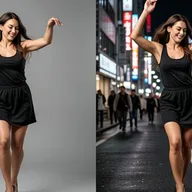
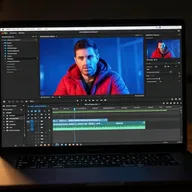
Change how a clip is lit after you filmed it. Pick golden hour, a softbox or a neon night, or describe the light, and get the same clip back, the same length, newly lit.
Start creatingOpens Relight video in Postally. Generation uses credits, shown before you run.
KEY FEATURES
Light is the mood. Change it later.
Fix a flat recording or give one clip several moods without filming again.
Thirteen presets.
Lighting, mood and atmosphere: golden hour, candlelit, moody low-key, morning mist, rainy night and more.
Or describe the light.
A preset writes into the prompt; edit it or write your own, up to 500 characters.
Same clip, same length.
The relit clip comes back as long as the one you gave it.
Billed by the second.
The price follows the length of your source clip.
Price before you run.
The credits are on the button before you start, so nothing is spent by surprise.
Lands in your library.
Every result saves to the brand’s Media library, ready to attach to a post, send for approval and schedule.
HOW IT WORKS
Relight a clip in three steps.
- Step 1
Add the clip
Upload an MP4 or MOV.
- Step 2
Choose the light
Pick a preset or describe the light you want.
- Step 3
Generate
The relit clip saves to your library.
WHAT YOU CAN MAKE
One clip, many moods.
Each idea opens Relight video with it written. Add your clip and run.
Rescue a flat recording
Give an overcast or office shot a flattering key light.
Try this promptRead the prompt
Soft, flattering studio key light from the front left with gentle fill, clean and even skin tones.
Golden hour, any hour
Warm, low sun for lifestyle and travel clips.
Try this promptRead the prompt
Warm golden hour sunlight from behind and to the side, glowing rim light, long soft shadows.
Night versions
Turn a day shot into neon or candlelight.
Try this promptRead the prompt
Neon night lighting, pink and blue signs reflecting on surfaces, deep shadows, cinematic contrast.
Seasonal moods
Mist, rain or sunset haze for a campaign’s look.
Try this promptRead the prompt
Rainy night atmosphere, cool blue light, wet reflections, soft glow from street lamps.
MODELS
The relighting model.
Relight video runs on one model.
- LightX
LightX relight
Re-lights the whole clip, billed per second of the source.
QUESTIONS
Before you start.
It changes the light and mood. The clip comes back the same length as your source.
Thirteen presets across lighting, mood and atmosphere, or any light you describe in up to 500 characters.
Runs use AI credits, billed per second of your clip. The tool shows the credits on its button before you run, so you see the price first. See the pricing page for the current plans.
Into your brand's Media library, like everything made in AI Studio. From there you can attach it to a post, send it for approval and schedule it.
Yes. The link opens the tool inside Postally, so you sign in first. Postally is in early access through the waitlist.

Relight video
Shoot now. Choose the light later.
Open Relight video, add the clip and pick the light. The price is on the button before you run.
Start creating