AI STUDIO · Change background
AI background changer:
a new scene, the same subject.
Add a photo, then describe the new background or add a picture to guide it. The subject stays; the scene around it is replaced.
Start creatingOpens Change background in Postally. Generation uses credits, shown before you run.
KEY FEATURES
Shoot once. Place it anywhere.
One product photo can become a kitchen, a beach, a studio and a holiday table.
Keeps the subject.
The product or person stays; only the scene is replaced.
Describe the scene.
Write the new background in up to 500 characters.
Or guide it with a picture.
Add a backdrop picture and Nano Banana 2 places the subject in it.
Eight versions at once.
Run up to eight and compare scenes side by side.
Price before you run.
The credits are on the button before you start, so nothing is spent by surprise.
Lands in your library.
Every result saves to the brand’s Media library, ready to attach to a post, send for approval and schedule.
HOW IT WORKS
Change a background in three steps.
- Step 1
Add the picture
One image with a clear subject.
- Step 2
Describe or show the scene
Write the new background, add a guidance picture, or both.
- Step 3
Generate
Run up to eight versions. They save to your library.
WHAT YOU CAN MAKE
Scenes to try.
Each prompt opens Change background with it written. Add your picture and run.
Product in a lifestyle scene
From a plain packshot to a home, a cafe or a desk.
Try this promptRead the prompt
On a light oak kitchen counter beside fresh herbs and a linen towel, soft morning window light.
Clean studio backdrop
A seamless color that matches your brand.
Try this promptRead the prompt
A seamless pastel sage studio backdrop with a soft floor shadow and even, diffused light.
Seasonal campaigns
The same product for summer, autumn and the holidays.
Try this promptRead the prompt
A festive winter table with pine branches, warm string lights and soft falling snow in the background.
Outdoors
Take the subject to a beach, a trail or a city street.
Try this promptRead the prompt
On a sandy beach at golden hour, gentle waves and warm low sun behind, shallow depth of field.
MODELS
Two models, two ways in.
Change background offers these by default.
- Bria
Bria Replace Background
Builds the new scene from your words.
- Google
Nano Banana 2
Used when you add a backdrop picture.
QUESTIONS
Before you start.
No. Add the original picture; the tool keeps the subject and replaces the scene.
Yes. Add it as image guidance and the subject is placed in it.
For video, use Replace background, which keeps the subject in every frame.
Runs use AI credits. The tool shows the credits on its button before you run, so you see the price first. See the pricing page for the current plans.
Into your brand's Media library, like everything made in AI Studio. From there you can attach it to a post, send it for approval and schedule it.
Yes. The link opens the tool inside Postally, so you sign in first. Postally is in early access through the waitlist.
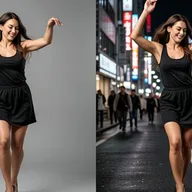

Change background
One photo, every setting.
Open Change background, add the picture and describe the scene. The price is on the button before you run.
Start creating