AI STUDIO · Text to video
AI text to video,
from one prompt.
Describe the shot, the light and the move. Pick a model, the shape and the length, and get a clip you can send for approval and schedule from the same app.
Start creatingOpens Text to video in Postally. Generation uses credits, shown before you run.
KEY FEATURES
Every leading video model, in one box.
Write once, then choose the model that suits the shot. The settings follow the model you pick.
Dozens of models.
Veo 3.1, Kling 3.0, Seedance 2.5, Wan 3.0, Hailuo, PixVerse, LTX 2.3, Grok Imagine and more.
Camera moves by name.
Add up to four moves to a prompt, from a slow pan to an orbit or an FPV drone run.
Up to 15 references.
Add pictures, clips or audio and call them by name in the prompt, as @image1 or @video1.
Multi-shot on Kling 3.0.
Plan up to six shots in one clip, 3 to 15 seconds in total.
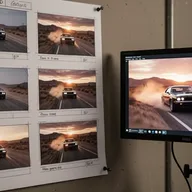
Preview a storyboard first.
See the clip as a sheet of captioned frames before you pay for the video.
Lands in your library.
Every result saves to the brand’s Media library, ready to attach to a post, send for approval and schedule.
HOW IT WORKS
From a sentence to a clip in three steps.
- Step 1
Describe the shot
Write what happens, where, and how the camera moves. Type @ to pull in a character, product or location.
- Step 2
Pick a model and the output
Choose the model, then the aspect ratio, resolution, length and whether it makes sound.
- Step 3
Generate
Run up to eight takes at once and keep the best. Each one saves to your library.
WHAT YOU CAN MAKE
Clips you can post.
Each prompt opens Text to video with it written. Change anything before you run.
Product moments
A hero shot of the thing you sell, lit and moving like an ad.
Try this promptRead the prompt
A matte black water bottle stands on wet slate, droplets running down its side, slow orbit around it, soft studio light, shallow depth of field.
Scroll-stopping openers
A two-second hook to put before a talking clip or a carousel.
Try this promptRead the prompt
Extreme close-up of a coffee cup as milk is poured, forming a leaf, fast push in, warm morning light, vertical framing.
Place and mood
Establishing shots of a city, a shop or a season for a brand story.
Try this promptRead the prompt
Drone fly-through over a quiet harbor town at sunrise, fishing boats below, mist on the water, cinematic color.
Characters in motion
Pull in a saved character with @ and put them in any scene.
Try this promptRead the prompt
A friendly cartoon fox in a yellow raincoat jumps over a puddle on a city street, slow motion splash, playful mood.
MODELS
Choose the model per shot.
Text to video offers these and more. Each shows only the lengths and sizes it supports.
- Google
Veo 3.1
720p or 1080p, 4 to 8 seconds, with sound.
- Kuaishou
Kling 3.0
3 to 15 seconds, with multi-shot.
- ByteDance
Seedance 2.5
4 to 30 seconds, six aspect ratios from 9:16 to 21:9.
- Alibaba
Wan 3.0
Clips up to 30 seconds.
- Lightricks
LTX 2.3
Up to 2160p, 6 to 10 seconds.
QUESTIONS
Before you start.
Start with Veo 3.1 for short clips with sound, Kling 3.0 when you want several shots in one clip, and Seedance 2.5 or Wan 3.0 when you need up to 30 seconds. You can switch models without rewriting the prompt.
It depends on the model: from a few seconds up to 30 seconds on Seedance 2.5 and Wan 3.0. The Output row shows only the lengths the chosen model supports.
Yes. Add up to 15 pictures, clips or audio as visual references and name them in the prompt. A reference clip is billed on its seconds.
Runs use AI credits, priced by model and length. The tool shows the credits on its button before you run, so you see the price first. See the pricing page for the current plans.
Into your brand's Media library, like everything made in AI Studio. From there you can attach it to a post, send it for approval and schedule it.
Yes. The link opens the tool inside Postally, so you sign in first. Postally is in early access through the waitlist.

Text to video
Your next clip starts with a sentence.
Open Text to video, write the shot and pick a model. The price is on the button before you run.
Start creating